
Introducing RenderingVideo - Video Infrastructure for AI Apps and Automation
RenderingVideo helps teams generate product videos, social clips, personalized videos, and agent-driven outputs through schemas, previews, render tasks, and webhooks.
 RenderingVideo Team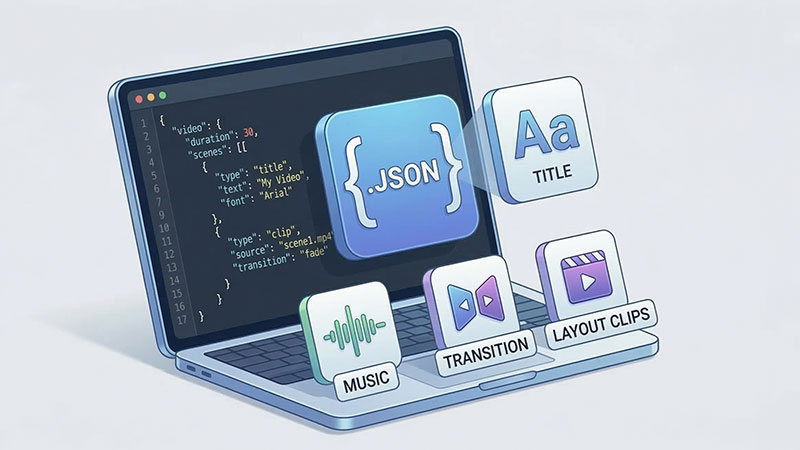
Introducing RenderingVideo - Video Infrastructure for AI Apps and Automation
In today's product landscape, teams do not just want to "make videos." They want to generate videos reliably inside products, workflows, and AI systems. RenderingVideo is built for that shift.
Instead of treating video generation as a one-off export step, RenderingVideo gives developers a programmable workflow for previews, formal render tasks, asset handling, and result delivery.
What is RenderingVideo?
RenderingVideo is a SaaS platform that provides video infrastructure for AI apps, SaaS products, and automation systems. Instead of manually editing videos or maintaining a custom rendering pipeline, you define the video in JSON and plug the workflow into your own product.
What teams use it for
- Product and promo videos generated from structured product data
- Social and short-form content created from scripts, feeds, and campaign assets
- Personalized videos driven by CRM, lifecycle, or customer-specific data
- Agent-driven outputs where AI apps generate video as part of a workflow
- Repeatable content systems that need previews, rendering, and delivery through APIs
Key Capabilities
- Schema-Based Video Definition: Define videos declaratively with AI Video JSON Schema v2
- Preview Before Render: Validate layouts, assets, and copy before final output
- Formal Render Tasks: Treat video generation as a trackable workflow, not a blocking export
- Asset Hosting and Reuse: Manage files across previews and production renders
- Webhook Delivery: Send results back into your product automatically
- Flexible Quality Options: Render at 720p, 1080p, or 2K resolution
How It Works
The core of RenderingVideo is our JSON schema that describes every aspect of your video:
{
  "meta": {
    "version": "2.0",
    "title": "My Video",
    "width": 1920,
    "height": 1080,
    "fps": 30,
    "background": "#000000"
  },
  "assets": {
    "fonts": [],
    "images": [],
    "videos": [],
    "audios": []
  },
  "tracks": [
    {
      "clips": [
        {
          "type": "text",
          "content": "Hello, World!",
          "start": 0,
          "duration": 5,
          "style": {
            "fontSize": 72,
            "color": "#ffffff"
          }
        }
      ]
    }
  ]
}
Supported Elements
| Element | Description |
|---------|-------------|
| text | Typography with rich styling options |
| image | Static images with transforms |
| video | Video clips with playback controls |
| audio | Background music and sound effects |
| rect | Rectangle shapes |
| circle | Circle shapes |
| polygon | Custom polygon shapes |
| subtitle | Caption and subtitle tracks |
| layout | Container layouts for complex compositions |
| template | Reusable template references |
Animation System
Create stunning visual effects with our animation system:
- Keyframes: Define property values at specific time points
- Easing Functions: Control animation curves (linear, ease-in, ease-out, etc.)
- Transitions: Smooth clip transitions with various effects
- Transform Properties: Animate position, rotation, scale, and opacity
{
  "type": "text",
  "content": "Animated Text",
  "animations": [
    {
      "property": "opacity",
      "keyframes": [
        { "offset": 0, "value": 0 },
        { "offset": 0.5, "value": 1 },
        { "offset": 1, "value": 0 }
      ],
      "easing": "easeInOut"
    }
  ]
}
Getting Started
1. Get Your API Key
Sign up at renderingvideo.com and obtain your API key from the dashboard.
2. Create Your First Video
curl -X POST https://renderingvideo.com/api/v1/video \
  -H "Authorization: Bearer YOUR_API_KEY" \
  -H "Content-Type: application/json" \
  -d '{
    "meta": {
      "version": "2.0",
      "title": "My First Video",
      "width": 1920,
      "height": 1080,
      "fps": 30
    },
    "tracks": [{
      "clips": [{
        "type": "text",
        "content": "Hello, RenderingVideo!",
        "start": 0,
        "duration": 3,
        "style": { "fontSize": 64, "color": "#ffffff" }
      }]
    }]
  }'
3. Monitor Rendering
The API returns a task ID that you can use to check the rendering status. Once complete, you'll receive a download URL for your video.
AI-Powered Video Generation
For developers who prefer natural language, our AI chat interface can generate video configurations from simple descriptions:
"Create a 10-second product showcase video with a blue background, featuring the product image in the center with a zoom-in animation, and add a title text 'Introducing Our Product' at the top."
The AI will generate the complete JSON schema for you, ready to render.
Pricing
RenderingVideo uses a credit-based system where 1 credit = 1 second of video at 720p resolution:
| Quality | Credit Multiplier | |---------|------------------| | 720p | 1x | | 1080p | 1.5x | | 2K | 2x |
Use Cases
- Marketing Videos: Generate product showcases, promotional content, and ads at scale
- Social Media Content: Create platform-optimized videos for Instagram, TikTok, YouTube
- E-learning: Produce educational video content programmatically
- Personalization: Generate personalized videos for each user
- Automation: Integrate video generation into your CI/CD pipeline
Start Building Today
Ready to add production-ready video generation to your application? Visit our Documentation to learn more, or try our Playground to experiment with the JSON schema.
RenderingVideo - Where Code Meets Video Creation